Ghost Scalper v5.0
Sign in to download
One-tap sign-in with Telegram, no email or password. After signing in we bring you back to this page.
Sign in with Telegram and downloadWhat you need to run it
- A broker account. We test every expert advisor in our monitoring on RoboForex — you can start with a free demo account. Open a RoboForex account. RoboForex also gives a free VPS with a balance from $300 and 3 lots traded per month.
- A VPS for the terminal. An expert advisor only trades while MetaTrader is open: with your computer off, trades are neither opened nor managed. A Forex VPS to keep the terminal running 24/7
These are partner links: if you open an account or order a VPS through them, we earn a commission.
Description from the Telegram post
Text by the author of the post where we found the file. Profit figures and promises in it are the words of the seller or the channel; we have not verified them.
🌐 Ghost Scalper MT5 V5.0 👑
👉 More about this EA: https://www.mql5.com/ru/market/product/189922
📊 Live monitoring: https://www.mql5.com/en/signals/2387100
📊 Live monitoring: https://www.mql5.com/en/signals/2387162
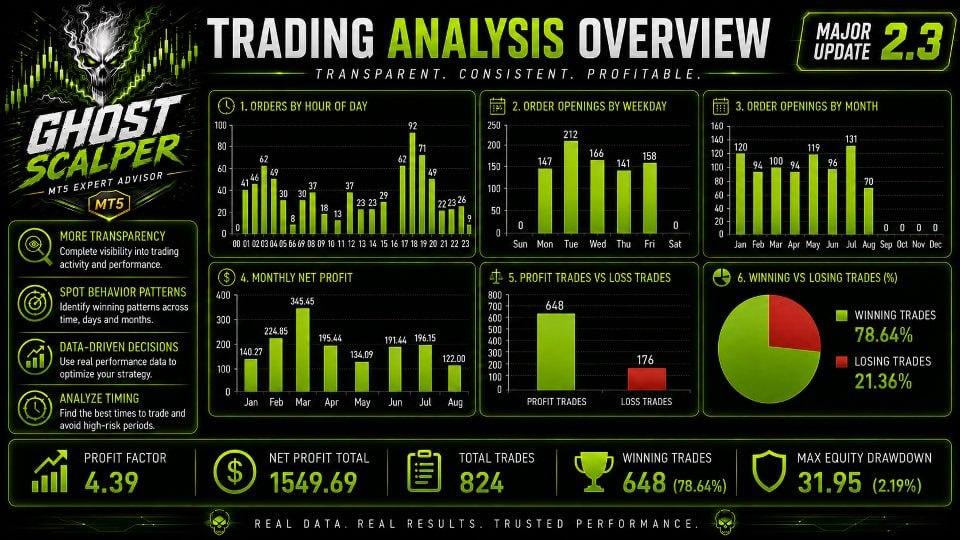
⭐️ Ghost Scalper MT5 is a fully automated expert advisor for gold (XAUUSD) trading on MetaTrader 5. Four independent strategies selectively identify trading opportunities based on breakouts and momentum moves. The EA does not trade continuously — it waits for internal conditions to align, so extended quiet periods with no trades are completely normal.
➡️ Instrument: XAUUSD / Gold
➡️ Timeframe: H1
---
💎 Key Features:
✅ Four independent strategies (Ghost A, B, C, D) — each can be enabled or disabled individually; BUY and SELL directions are also configured independently
✅ Per-strategy money management: Fixed Lot, Risk Percent, or Risk per Balance
✅ Two trailing modes — STANDARD (internally optimized SL/TP/Trailing parameters) and CUSTOM (manual configuration of Stop Loss, Take Profit, Trailing Start, Distance, and Step for each direction)
✅ Adaptive Anti-Slippage technology — the EA analyzes real broker slippage and automatically compensates for it in the Trailing Stop, SL, and TP logic; three adaptation levels: SOFT (25%), MEDIUM (50%, default), HARD (100%)
✅ Prop Firm Protection — an advanced risk-control system covering: max daily drawdown, max total drawdown, per-trade risk limit, total risk limit across open positions and pending orders, daily profit target, and a configurable Safety Buffer
✅ News filter — covers major U.S. events: FOMC, CPI, NFP, PCE; by default trading is paused 30 minutes before and 30 minutes after each event; News Week Risk Mode is also available
✅ Weekend time filter — blocks new orders from Friday 22:00 to Monday 00:00 broker server time
✅ Virtual stop mechanism — a fallback Stop Loss manager in case the broker rejects a level modification
---
🛡 Prop Firm Protection (Ghost Scalper 5.1):
Default settings (fully customizable):
✅ Max daily drawdown: 4%
✅ Max total drawdown: 6%
✅ Max risk per trade: 0.5%
✅ Max combined risk of open positions and pending orders: 2%
✅ Action on limit hit: BLOCK ONLY or CLOSE POSITION
✅ Starting balance: automatic or manual
✅ Daily reset based on broker server time
> ⚠️ The system monitors account equity and risk across all positions, including trades from other EAs and manual trades. Protection is disabled by default. Full compliance with any specific prop firm's rules is not guaranteed.
---
⚙️ Setup & Launch:
To enable the news filter, WebRequest must be allowed in MetaTrader 5:
1. Open MT5 → Tools → Options → Expert Advisors
2. Enable the option "Allow WebRequest for listed URLs"
3. Add the URL specified in the EA settings
Default CUSTOM trailing values:
✅ Stop Loss: 800
✅ Take Profit: 2500
✅ Trailing Start: 250
✅ Distance: 150
✅ Step: 80
> ⚠️ When running multiple strategies simultaneously, keep the total account risk in mind. Real broker slippage is not replicated in the MT5 Strategy Tester — backtest results may differ from live trading.
Where this file comes from
We are not the developers of this expert advisor. The file was found in open access — in public Telegram channels where it was shared for free — and added to the catalog together with its description. All rights to the program belong to its author; if the expert advisor has a page in the MQL5 Market, the link is in the description — support the developer by buying the official version.
Are you the copyright holder and want the file removed? Contact us — we remove it on the first request.
Скриншоты (3)
Sign in to download
One-tap sign-in with Telegram, no email or password. After signing in we bring you back to this page.
Sign in with Telegram and downloadWhat you need to run it
- A broker account. We test every expert advisor in our monitoring on RoboForex — you can start with a free demo account. Open a RoboForex account. RoboForex also gives a free VPS with a balance from $300 and 3 lots traded per month.
- A VPS for the terminal. An expert advisor only trades while MetaTrader is open: with your computer off, trades are neither opened nor managed. A Forex VPS to keep the terminal running 24/7
These are partner links: if you open an account or order a VPS through them, we earn a commission.
Share:
How to use
1.Download the file
2.Open MetaTrader 4 or MetaTrader 5
3.Put .ex4/.ex5 files into the MQL4/Experts or MQL5/Experts
4.Restart the terminal and the file will appear in the Navigator
Frequently asked questions
How do I install an expert advisor in MetaTrader?
1. Download the expert advisor file (.ex4 or .ex5)
2. Open MetaTrader and go to File → Open Data Folder
3. Go to MQL4/Experts (for MT4) or MQL5/Experts (for MT5)
4. Copy the expert advisor file into that folder
5. Restart MetaTrader
6. The expert advisor will appear in Navigator → Expert Advisors
Why is the expert advisor not trading?
Check the following:
• The "Algo Trading" button is enabled (green)
• Trading is allowed in the expert advisor settings
• The terminal is connected to the broker server
• There are enough funds on the account
• The right symbol and timeframe are selected
Can I use it on a live account?
We recommend testing the expert advisor first:
1. In the strategy tester on historical data
2. On a demo account in real time for at least 1–2 weeks
3. Move to a live account only after successful tests
⚠️ Forex trading involves a risk of losing capital
The file does not open or shows an error
Possible reasons:
• .ex4 files are for MT4 only, .ex5 files are for MT5 only
• The file was damaged while downloading — try downloading it again
• MetaTrader is outdated — update the terminal
• If the file is in an archive (.zip, .rar), unpack it first
Загрузка отзывов...