DS Gold Robot MT4 fix
Sign in to download
One-tap sign-in with Telegram, no email or password. After signing in we bring you back to this page.
Sign in with Telegram and downloadWhat you need to run it
- A broker account. We test every expert advisor in our monitoring on RoboForex — you can start with a free demo account. Open a RoboForex account. RoboForex also gives a free VPS with a balance from $300 and 3 lots traded per month.
- A VPS for the terminal. An expert advisor only trades while MetaTrader is open: with your computer off, trades are neither opened nor managed. A Forex VPS to keep the terminal running 24/7
These are partner links: if you open an account or order a VPS through them, we earn a commission.
Description from the Telegram post
Text by the author of the post where we found the file. Profit figures and promises in it are the words of the seller or the channel; we have not verified them.
🌐 DS Gold Robot V4.0 MT4 Expert Advisor 👑
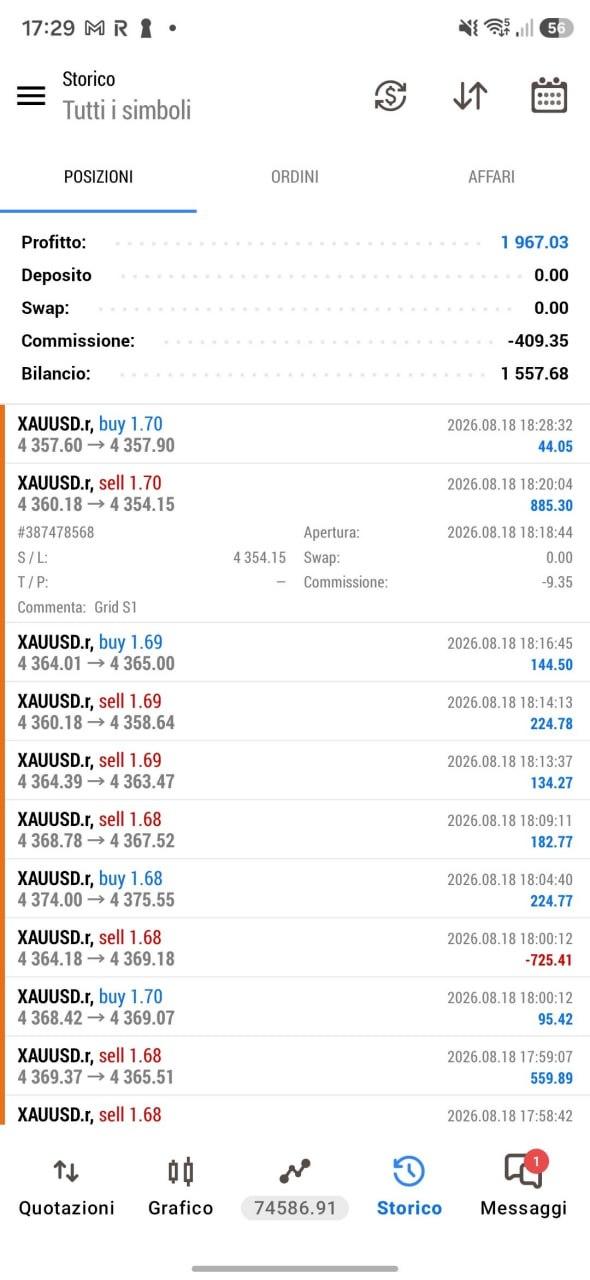
⭐️ Meet DS Gold Robot — your go-to trading companion for navigating the complex world of XAUUSD. Built with precision and powered by advanced algorithms, DS Gold is a forex trading robot engineered to optimize your trading performance on XAUUSD. With its advanced analytical capabilities, DS Gold Robot continuously monitors the gold market, pinpointing key trends, patterns, and price movements at lightning speed. The EA opens positions every day, Monday through Friday, and every position is protected by take profit (TP), stop loss (SL), trailing stop, and breakeven — plus additional safeguards (max loss, max drawdown %) and a built-in recovery system. This EA also lets you earn good cashback on your account — many websites offer this service, allowing you to recover a portion of the spread you pay your broker as an extra income stream. The EA includes a MaxOrders parameter that controls the number of open positions; it defaults to 5 but can be set to any value — setting it to 1, for example, forces the EA to open only one position at a time. To get started quickly, all settings come pre-configured by default — the only parameter you need to adjust is the lot size.
💎 Key Features:
✅ Compatible with all brokers
✅ Trades the popular XAUUSD pair
✅ Maximum number of open positions per day
✅ Tested product developed by experienced programmers
✅ Quick setup — only one parameter needs to be changed
✅ Dashboard showing the forex calendar, daily pips, daily profit, current trading session, and more...
✅ All positions protected by automatic take profit (TP), stop loss (SL), trailing stop, and breakeven.
➡️ Info:
➡️ Pair: XAUUSD
➡️ Timeframe: M5.
➡️ Min. lot size: 0.01.
Where this file comes from
We are not the developers of this expert advisor. The file was found in open access — in public Telegram channels where it was shared for free — and added to the catalog together with its description. All rights to the program belong to its author; if the expert advisor has a page in the MQL5 Market, the link is in the description — support the developer by buying the official version.
Are you the copyright holder and want the file removed? Contact us — we remove it on the first request.
Скриншоты (3)
Sign in to download
One-tap sign-in with Telegram, no email or password. After signing in we bring you back to this page.
Sign in with Telegram and downloadWhat you need to run it
- A broker account. We test every expert advisor in our monitoring on RoboForex — you can start with a free demo account. Open a RoboForex account. RoboForex also gives a free VPS with a balance from $300 and 3 lots traded per month.
- A VPS for the terminal. An expert advisor only trades while MetaTrader is open: with your computer off, trades are neither opened nor managed. A Forex VPS to keep the terminal running 24/7
These are partner links: if you open an account or order a VPS through them, we earn a commission.
Share:
How to use
1.Download the file
2.Open MetaTrader 4 or MetaTrader 5
3.Put .ex4/.ex5 files into the MQL4/Experts or MQL5/Experts
4.Restart the terminal and the file will appear in the Navigator
Frequently asked questions
How do I install an expert advisor in MetaTrader?
1. Download the expert advisor file (.ex4 or .ex5)
2. Open MetaTrader and go to File → Open Data Folder
3. Go to MQL4/Experts (for MT4) or MQL5/Experts (for MT5)
4. Copy the expert advisor file into that folder
5. Restart MetaTrader
6. The expert advisor will appear in Navigator → Expert Advisors
Why is the expert advisor not trading?
Check the following:
• The "Algo Trading" button is enabled (green)
• Trading is allowed in the expert advisor settings
• The terminal is connected to the broker server
• There are enough funds on the account
• The right symbol and timeframe are selected
Can I use it on a live account?
We recommend testing the expert advisor first:
1. In the strategy tester on historical data
2. On a demo account in real time for at least 1–2 weeks
3. Move to a live account only after successful tests
⚠️ Forex trading involves a risk of losing capital
The file does not open or shows an error
Possible reasons:
• .ex4 files are for MT4 only, .ex5 files are for MT5 only
• The file was damaged while downloading — try downloading it again
• MetaTrader is outdated — update the terminal
• If the file is in an archive (.zip, .rar), unpack it first
Загрузка отзывов...