Advanced Dashboard for Currency Strength and Speed V5 5 Indicator
IndicatorSign in to download
One-tap sign-in with Telegram, no email or password. After signing in we bring you back to this page.
Sign in with Telegram and downloadDescription from the Telegram post
Text by the author of the post where we found the file. Profit figures and promises in it are the words of the seller or the channel; we have not verified them.
🌐 Advanced Currency Strength & Speed Dashboard MT4 V5.5 🔔
👉 Learn more about the indicator https://www.mql5.com/en/market/product/25461 👀
📝 User guide https://www.mql5.com/en/blogs/post/708783 ✅
⭐️ The best solution for any beginner or experienced trader!
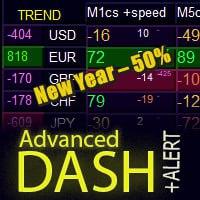
This dashboard software works with 28 forex pairs plus one additional symbol. It is built on two of our core indicators (Advanced Currency Strength 28 and Advanced Currency Impulse) and gives you a comprehensive overview of the entire forex market — including gold or index readings. It displays Advanced Currency Strength values, currency movement speed, and signals for all 28 forex pairs across all 9 timeframes. Imagine how much your trading improves when you can watch the entire market from a single indicator on your chart — pinpointing trends and/or scalping opportunities with precision!
We've packed this indicator with features that make it even easier to identify strong and weak currencies and to spot and confirm potential trade setups. The indicator visually shows whether a currency's strength or weakness is growing or fading, and tracks how it performs across every timeframe.
New features include dynamic Fibonacci market levels that adapt to changes in current market conditions — a proven enhancement already in use in our Advanced Currency Strength 28 and Advanced Currency Impulse indicators.
Always trade the pair that pits a weak currency against a strong one — and this indicator is built to help you do exactly that.
💎 Key Features:
✅ Displays ACS28 currency strength values and GAP-speed (Impulse) for every timeframe.
✅ Add 1 extra symbol — such as gold or an index (e.g. XAUUSD or US30).
✅ Columns: color-coded in 7 shades to reflect currency strength: extreme strong / strong / mild strong / neutral / mild weak / weak / extreme weak.
✅ Left column: shows the currency trend with a strength rating across all timeframes plus a trend alert.
✅ When 3 consecutive timeframes align, those 3 blocks are highlighted with a combined rating.
✅ When a pattern forms, a button appears below the timeframe column for the strongest pair along with an alert.
✅ Click the button to open the chart for that pair/timeframe.
✅ Quick chart buttons: click any 2 currency names to instantly open any pair in a new window.
✅ Auto-refresh of quote charts for all 28 pairs and timeframes keeps all MetaTrader 4 data current.
Where this file comes from
We are not the developers of this expert advisor. The file was found in open access — in public Telegram channels where it was shared for free — and added to the catalog together with its description. All rights to the program belong to its author; if the expert advisor has a page in the MQL5 Market, the link is in the description — support the developer by buying the official version.
Are you the copyright holder and want the file removed? Contact us — we remove it on the first request.
Скриншоты (4)
Sign in to download
One-tap sign-in with Telegram, no email or password. After signing in we bring you back to this page.
Sign in with Telegram and downloadShare:
How to use
1.Download the file
2.Open MetaTrader 4 or MetaTrader 5
3.Put .ex4/.ex5 files into the MQL4/Experts or MQL5/Experts
4.Restart the terminal and the file will appear in the Navigator
Frequently asked questions
How do I install an expert advisor in MetaTrader?
1. Download the expert advisor file (.ex4 or .ex5)
2. Open MetaTrader and go to File → Open Data Folder
3. Go to MQL4/Experts (for MT4) or MQL5/Experts (for MT5)
4. Copy the expert advisor file into that folder
5. Restart MetaTrader
6. The expert advisor will appear in Navigator → Expert Advisors
Why is the expert advisor not trading?
Check the following:
• The "Algo Trading" button is enabled (green)
• Trading is allowed in the expert advisor settings
• The terminal is connected to the broker server
• There are enough funds on the account
• The right symbol and timeframe are selected
Can I use it on a live account?
We recommend testing the expert advisor first:
1. In the strategy tester on historical data
2. On a demo account in real time for at least 1–2 weeks
3. Move to a live account only after successful tests
⚠️ Forex trading involves a risk of losing capital
The file does not open or shows an error
Possible reasons:
• .ex4 files are for MT4 only, .ex5 files are for MT5 only
• The file was damaged while downloading — try downloading it again
• MetaTrader is outdated — update the terminal
• If the file is in an archive (.zip, .rar), unpack it first
Загрузка отзывов...