Assar Phoenix Elite Trading Robot
Assar Phoenix Elite is a powerful multi-currency EA for aggressive trading, supporting 10+ currency pairs with built-in deposit protection. Download it free for MT4.
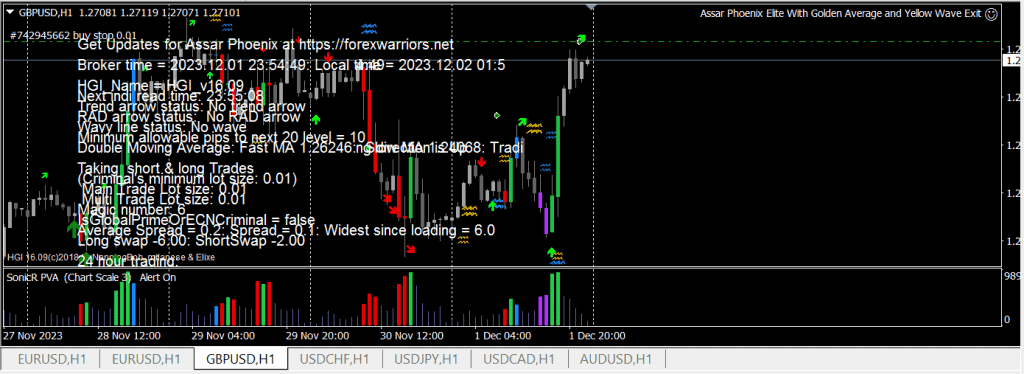

Recommendations for using Assar Phoenix Elite:
- Minimum account balance: 100$ or the equivalent in a cent account. It can also work with smaller deposits
- Works only on H1 and H4
- Most effective with major currency pairs: AUDUSD, EURUSD, GBPUSD, USDCAD, USDJPY, USDCHF. Can work with any currency pair (be careful with volatile pairs. Try to avoid aggressive trading because the trend can change very quickly at any time)
- The EA Assar Phoenix Elite cannot be backtested in the Strategy Tester
- Most effective on ECN accounts
- It is recommended to run Assar Phoenix Elite on an always-on VPS to achieve consistent results. We recommend a reliable forex VPS such as MyForex VPS or WeaselCloud.
Assar Phoenix Elite is a fully automated MT4 expert advisor developed by Assar Elite Developer. Its description presents the underlying strategy as one of the most profitable trend-following strategies, researched, analyzed and tested for 5 years. The robot uses the “Nanningbob's Holy Grail” indicator, also known as HGI.
This EA was originally created in 2020 for the developer’s copy trading service. It is described as having achieved exceptional results and built a client base of more than 300 people. We are testing the updated version, Assar Phoenix Elite 2022.
So what is the Holy Grail Indicator? How does HGI differ from other systems and concepts in the market?
HGI provides several types of signals. Visit the developer’s Telegram channel to learn more about the indicator and how to trade it manually.
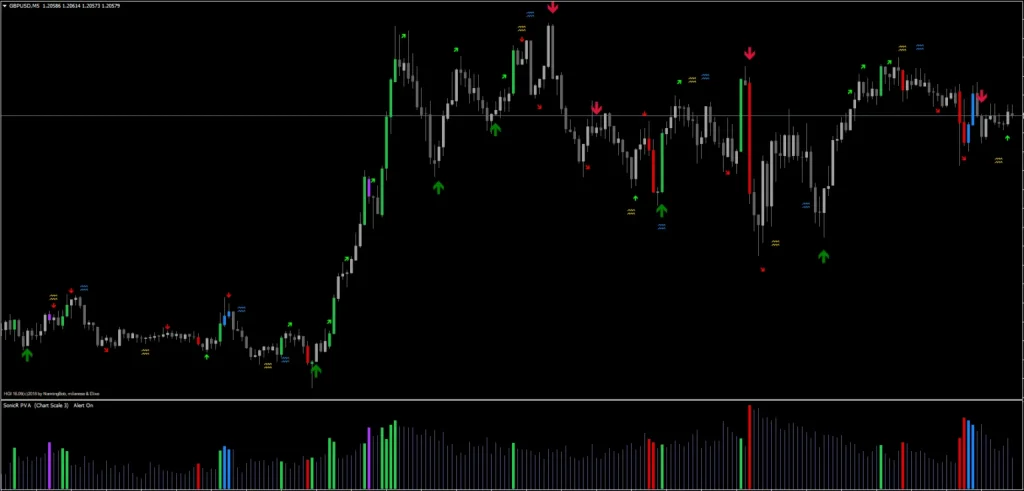
HGI implements five trading methods to cover all market conditions:
- Trend trading: TMA detects a strong market trend and marks it with large arrows: a large green arrow for an uptrend and a large red arrow for a downtrend.
- Breakout or trend re-entry trading — RAD trading: these trades are marked with small diagonal red (sell) and green (buy) arrows. They can indicate a breakout after the market has ranged for some time, or a resumption of the previous trend after a pause.
- Multi-level trend and RAD trades: these are described as extremely profitable. For example, the robot generates a trend buy signal. It also places pending buy stop orders at each 20-point level: 118.2, 118.4, 118.6, and so on. Each trade targets 30 points, creating a 10-point overlap, but only two multi-level trades are open simultaneously.
- Wave-line trading: this is multi-level trading that places pending orders at each 20-point level as soon as a blue wave line appears. The EA places pending buy orders when the market is above the line and sell orders when it is below. You can choose whether the first trade uses a market or pending order.
- Combined trend and wave-line trading: this is the strongest signal combination. Imagine a large green arrow appearing together with blue wave lines below price.
There are three versions of the EA for trading HGI indicator signals. Assar Phoenix Elite EA trades all types except range trading.
- Assar Phoenix Elite with RAD or Trend signal exits
- Assar Phoenix Elite with yellow wave-line exits
- Assar Phoenix with blue wave-line exits
The strategy’s flexibility is a key feature. You can trade any number of currency pairs, with any starting deposit and risk level. You have full access to every parameter and can choose your own signals and exits.
IF YOU ARE NEW TO FOREX TRADING - use the default settings.
A detailed manual is available for advanced users:
The archive containing Assar Phoenix Elite also includes four leading trade management tools: a trading time filter, an equity target filter, a target based on a percentage of the deposit, and a stealth trade manager that hides your trailing stops and take profits.
- Assar Auto Trading Time Filter
- Assar Elite Equity Target
- Assar Equity Percentage Target
- Assar Individual Trade Manager (hidden trailing stop)
First, test on a demo account for at least a week. Also familiarize yourself with Assar Phoenix Elite’s capabilities and statistics, before using it on a live account.
The download link is available to registered users!
Conclusions:
The archive contains a completely free, unrestricted robot from the Assar group’s Telegram channel. In our view, it is one of this developer’s best EAs. It is based on the fundamentals of financial market trading (trend movements) and is certainly worth studying and testing.
The EA’s demo account trading results are below:
Deposit: 1000
Pairs: major currency pairs: AUDUSD, EURUSD, GBPUSD, USDCAD, USDJPY, USDCHF. As testing progresses, we may add pairs for diversification.
EA version being tested: Assar Phoenix Elite With Golden Average and Rad or Trend Exits for all pairs except GBPUSD, Assar Phoenix Elite With Golden Average and Yellow Wave Exit on GBPUSD
Lot size: fixed at 0.01
UPD 05.07.2024: does not work on MT4 build 1420+.

Share this article:
Comments (0)
No comments yet
Be the first to leave a comment!